
Framer has quickly become one of the most popular website builders for freelancers, agencies, startups, and creators. But with multiple pricing tiers now available, choosing the right plan can feel confusing at first.
Whether you're building a portfolio, launching a client website, or creating a larger marketing site with CMS content, the plan you choose will directly affect what features you have access to.
In this guide, I’ll break down every Framer pricing plan in 2026, explain who each one is best suited for, and help you figure out which option actually makes sense for your website.
How Much Does Framer Cost in 2026?
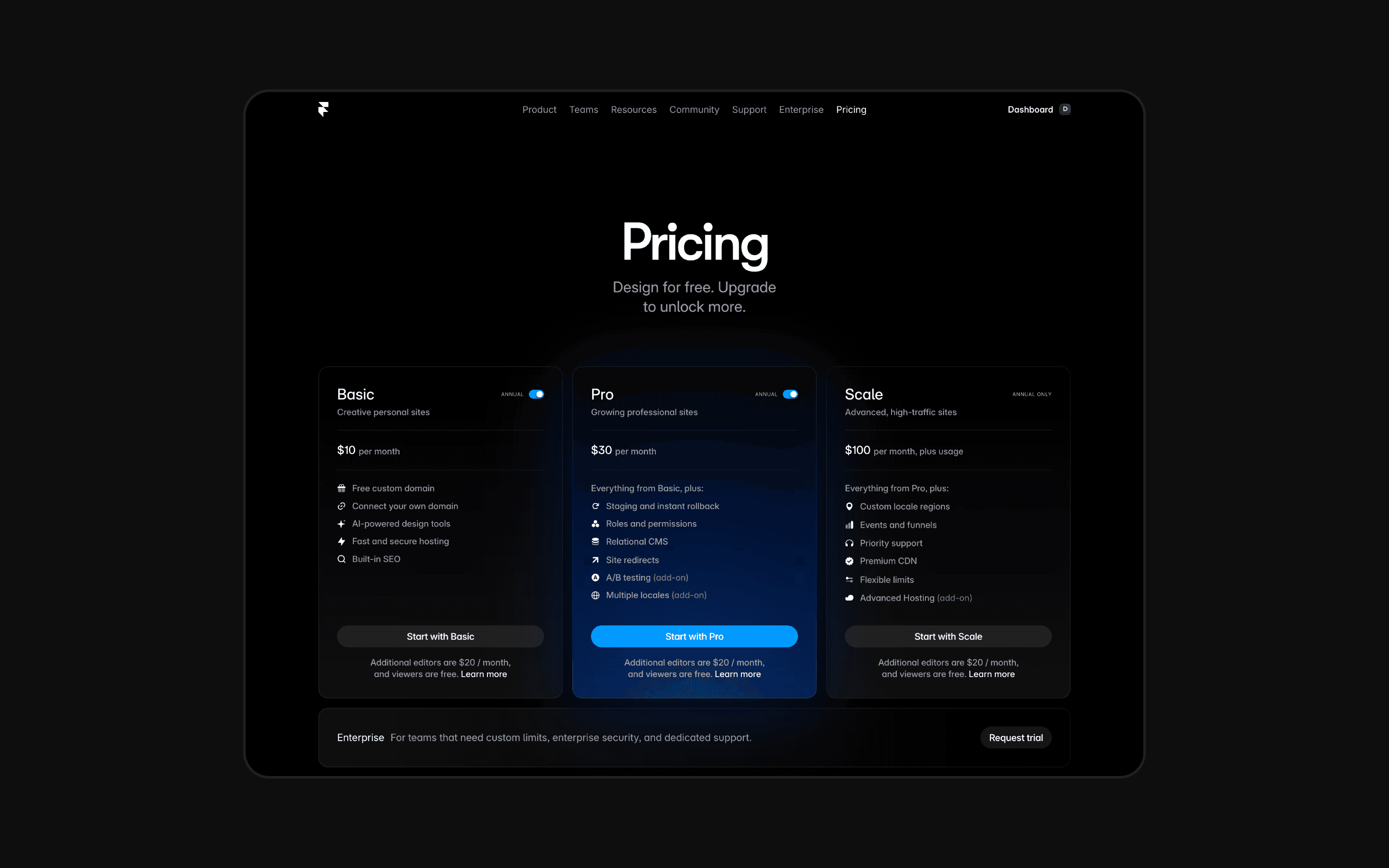
Framer pricing plans were recently simplified to make picking the right plan for you even easier. They currently offers five main pricing tiers, ranging from the Free plan all the way up to Enterprise.
Plan | Starting Price | Best For |
|---|---|---|
Free | $0 | Learning Framer and creating a basic website |
Basic | $10/month (annual billing) | Freelancers and small websites |
Pro | $30/month (annual billing) | Professional websites and CMS-heavy projects |
Scale | $100/month (annual billing) | Agencies, startups, and larger businesses |
Enterprise | Custom pricing | Large organisations and teams |
Monthly billing is available for some plans, although annual billing is significantly cheaper in most cases. Framer also offers additional add-ons for things like localisation, advanced analytics, and extra collaboration features. You also currently get a free domain for 12 months when purchasing an annual plan, so it's definitely the better option.
One important thing to understand is that Framer pricing is split between site plans and workspace collaboration pricing. That distinction becomes much more important once you start working with teams or clients.
At first glance, Framer’s pricing can seem relatively simple. But once you begin adding CMS content, additional editors, staging environments, and localisation, the differences between each plan become much more important.
Why Framer Pricing Can Feel Confusing
One of the reasons so many people search for terms like “Framer pricing”, “Framer plans”, or “Framer basic plan” is because the platform handles hosting and collaboration differently from many traditional website builders.
Most website builders focus primarily on the website itself. Framer, however, also puts a big emphasis on team collaboration and workspace management. That means the total cost is not always just the advertised monthly site price.
For example, a solo freelancer building a small portfolio website may only need the Basic plan. But an agency managing multiple websites with several team members may also need to consider editor pricing, staging environments, higher CMS limits, and increased bandwidth.
The good news is that most people do not need the more expensive plans.
The key is simply choosing the plan that matches the type of website you are actually building, which Framer makes super easy.
Framer’s Latest May 2026 Pricing Changes
Framer also recently made several updates to its pricing plans based directly on community feedback, particularly around bandwidth, CMS limits, and editor pricing.
One of the biggest updates was to the Basic plan.
Previously, the Basic plan only included 10 GB of bandwidth and a single CMS collection, which made it feel fairly restrictive for growing websites. Framer has now increased the Basic plan to include 50 GB of bandwidth and 2 CMS collections at the same price.
That is a significant improvement for freelancers and small businesses because it makes the Basic plan much more practical for SEO-focused websites, blogs, and smaller CMS-driven projects.
This change also closes the gap slightly between the Basic and Pro plans, especially for creators who were previously upgrading to Pro mainly because of CMS limitations.
Framer also adjusted editor pricing after receiving feedback from agencies and teams.
Previously, editor seats on higher-tier plans could cost up to $40/month per editor. Framer has now reduced editor pricing to $20/month across all plans, which makes collaboration significantly more affordable for agencies and growing teams.
On top of that, Framer introduced a new “Content Editor” role priced at $10/month. This role is designed specifically for clients, marketers, and content teams who only need access to CMS content, localisation, or on-page editing rather than the full design editor.
For agencies and client projects, this is a genuinely useful addition because it gives clients limited editing access without forcing them onto a full editor seat.
Overall, these updates make Framer’s pricing feel much more competitive than it did previously, particularly for smaller teams and CMS-focused websites.
AI Credits and Framer Agents
Alongside the launch of Framer's new AI Agents, Framer also introduced a new AI credit system across all pricing plans. Rather than charging separately for each AI feature, every workspace now receives a monthly allowance of AI credits based on its plan, with the option to purchase additional credits if needed.
AI credits are used whenever an Agent performs work for you, such as generating pages from a prompt, creating layouts from screenshots, writing code components, restructuring CMS collections, translating content, or carrying out other AI-powered tasks. Smaller requests, like editing text, use very few credits, while larger tasks, such as generating an entire page, consume more.
For most users, the included monthly credits will be enough for day-to-day use. However, if you plan on relying heavily on Framer's AI Agents as part of your workflow, it's worth considering the AI credit allowance included with each plan alongside the traditional limits like bandwidth, CMS collections, and pages. If you reach your monthly limit, AI-powered features that consume credits will pause until your credits reset or you purchase additional credits.
Framer Free Plan
The Framer Free plan is designed primarily for learning the platform and experimenting with projects before launching a real website. It can be used for fairly large projects, you just won't be able to connect a custom domain and really make you site feel like your own.
It gives you access to the Framer editor, CMS functionality, and publishing on a Framer subdomain. For beginners, it’s a great way to get comfortable with the platform without needing to commit financially straight away. You also get access to Framer's AI tools including AI agents and Workshop. The free tier gives you 500 credits per month to try out these tools.
The biggest limitation of the Free plan is that you cannot connect a custom domain. Your website will remain on a Framer subdomain, which makes it unsuitable for most professional projects.
That said, the Free plan is still surprisingly generous. You can experiment with layouts, test animations, build landing pages, and even try premium templates before deciding whether you want to upgrade.
Best For
The Free plan is best suited for beginners learning Framer, designers experimenting with layouts, or anyone testing ideas before launching a production website.
Key Features
1,000 pages
10 CMS collections
Framer subdomain
Up to 3 editors in free workspaces
Basic CMS functionality
500 AI agents credits per month
For most professional websites, you will eventually need to upgrade to a paid plan.
Framer Basic Plan
The Basic plan is where most people start once they are ready to launch a real website.
At $10/month when billed annually, it’s one of the more affordable professional website builders available right now. For freelancers, creators, and small businesses, the Basic plan often hits the sweet spot between affordability and functionality.
The Basic plan includes everything most people need to launch a professional website with a custom domain. You get responsive hosting, password protection, and access to Framer’s design system, all without needing to touch code.
For portfolios, landing pages, and smaller business websites, the Basic plan is usually more than enough. If your website is relatively simple and does not rely heavily on CMS content, there is a good chance you will not need to upgrade beyond this tier for quite a while.
Best For
The Basic plan is best suited for freelancers, portfolio websites, small businesses, and simple marketing sites that do not rely heavily on CMS content.
Key Features
Custom domain support
Up to 30 pages
50 GB bandwidth
Password protection
2 CMS collection with 1,000 items
1,000 AI agents credits per month
The main limitation comes once your website starts growing. If you eventually want to add a blog, multiple CMS collections, or more advanced SEO-focused content structures, you will probably outgrow the Basic plan fairly quickly.
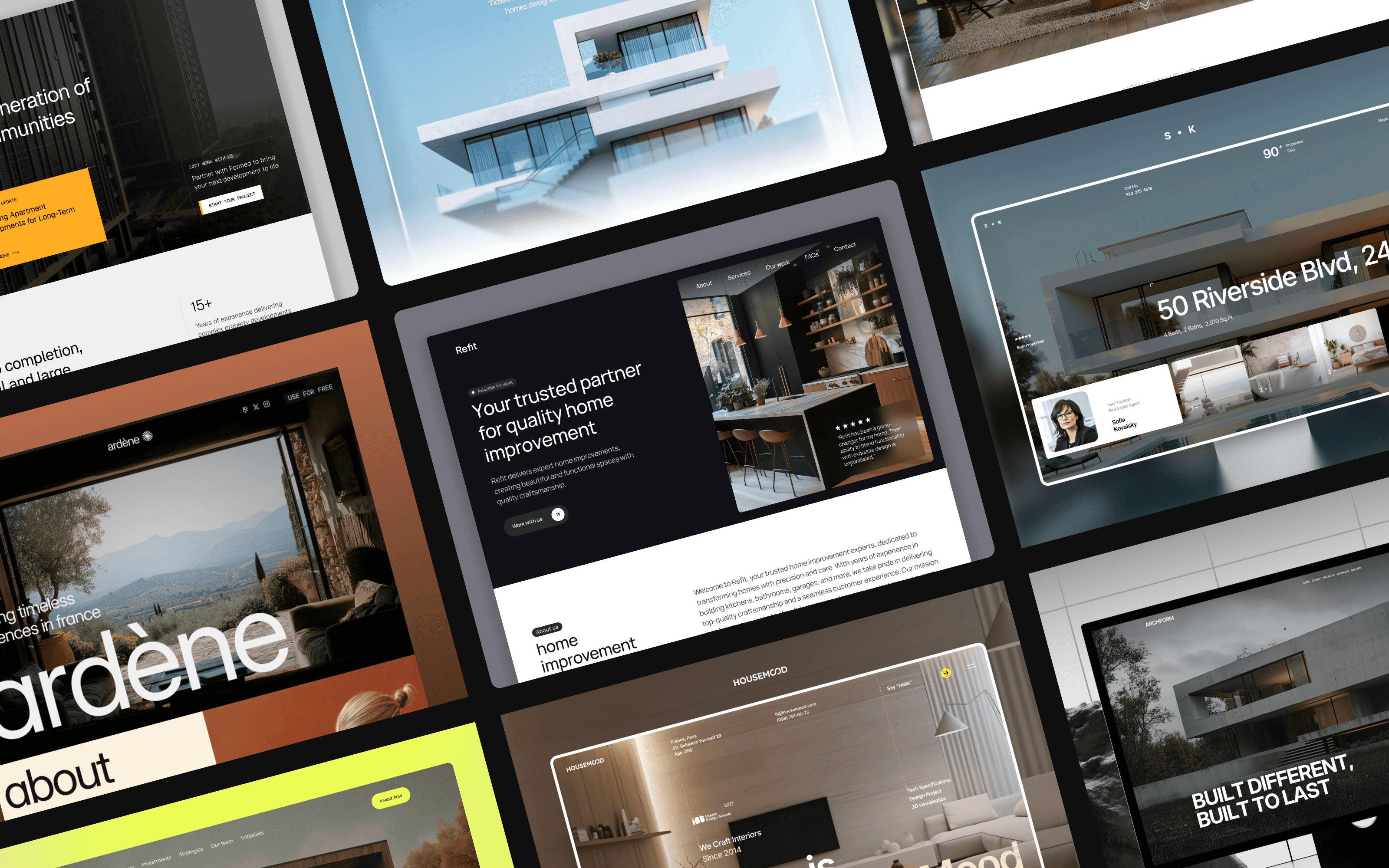
For example, if you were building a real estate website with listings, blog content, testimonials, and location pages, you would almost certainly want the Pro plan instead.
You can see examples of CMS-heavy real estate websites here
Which Framer Plan Should Freelancers Choose?
For most freelancers, the Basic plan is usually enough when starting out.
If you are mainly building portfolio websites, landing pages, or smaller client projects, the Basic plan covers most needs without forcing you to overpay for features you are unlikely to use.
The point where freelancers typically outgrow Basic is when they begin building larger CMS-driven websites or SEO-focused projects. Blogs, directories, resource hubs, and content-heavy client sites often require more CMS flexibility than the Basic plan provides.
That is usually the point where upgrading to Pro becomes worth it.
A good rule of thumb is that Basic works best for simple websites, while Pro is better suited for scalable websites that are expected to grow over time.
Framer Pro Plan
The Pro plan is where Framer starts to become much more powerful.
This is the plan most professional freelancers, agencies, and growing businesses eventually end up using because it removes many of the restrictions found in the Basic plan.
At $30/month billed annually, the jump in price is noticeable, but so is the jump in flexibility.
The biggest advantage of the Pro plan is CMS scalability. You get far more flexibility for blogs, SEO-focused websites, and larger marketing sites. Framer also introduces features like staging environments and redirects, which become increasingly important for professional workflows.
If you plan on publishing blog content regularly, managing multiple CMS collections, or scaling traffic through SEO, the Pro plan is usually the better long-term option.
Best For
The Pro plan is best suited for agencies, CMS-heavy websites, professional client projects, blogs, and businesses focused on long-term growth.
Key Features
Up to 150 pages
10 CMS collections
2,500 CMS items
Redirects and staging
100 GB bandwidth
3,000 AI agents credits per month
In my opinion, most serious Framer websites eventually end up on Pro. This is especially true for websites that rely heavily on content marketing or SEO.
Blogs, directories, agency sites, template stores, and real estate websites all tend to outgrow the Basic plan relatively quickly.
Which Framer Plan Is Best for Blogs?
If your goal is to grow traffic through SEO and content marketing, the Pro plan is usually the best choice.
The main reason is CMS flexibility.
The Basic plan only includes one CMS collection with up to 1,000 items. While that sounds like a lot initially, blogs can grow surprisingly quickly over time.
A serious blog may eventually need separate CMS collections for articles, categories, authors, resources, case studies, and templates. Once you start building more advanced content structures, the limitations of the Basic plan become much more noticeable.
That is why most SEO-focused Framer websites eventually move to Pro, even if the Basic plan initially feels sufficient.
Which Framer Plan Is Best for Real Estate Websites?
Real estate websites are one of the best examples of websites that usually need the Pro plan.
That is because real estate websites often rely heavily on CMS content. Property listings, testimonials, agents, blog content, locations, and resource pages can all quickly add up.
Even relatively small real estate websites can outgrow the Basic plan once they start expanding their SEO strategy or content structure.
If you are building a simple brochure-style real estate website, the Basic plan may still be enough. But if you are building something more content-heavy or SEO-focused, the Pro plan is almost always the safer long-term choice.
You can see examples of real estate Framer templates here
Which Framer Plan Is Best for Agencies?
Most agencies will eventually end up using the Pro plan.
Agency websites typically need multiple CMS collections, higher bandwidth, collaboration features, redirects, and staging environments. Those are all areas where the Pro plan becomes significantly more useful than Basic.
The biggest issue agencies run into is editor pricing.
For solo users, Framer pricing is relatively affordable. But once multiple editors and collaborators are involved, the cost can increase much faster than expected.
For example, a solo freelancer on Pro may only pay around $30/month. But a small agency with several designers, marketers, and content editors could easily end up paying well over $100/month after editor seats are added.
Despite this, many agencies still prefer Framer because the workflow feels significantly faster and more modern than many competing platforms.
Framer Scale Plan
The Scale plan is designed for larger businesses and high-traffic websites that need significantly more CMS capacity, bandwidth, and scalability.
This is not the plan most freelancers or small businesses need. However, for startups, agencies, and companies running their entire marketing site on Framer, it can make sense.
Scale introduces higher CMS limits, advanced analytics, and significantly more bandwidth, which makes it much better suited for websites expecting large amounts of traffic.
At this point, Framer starts to feel much closer to an enterprise-grade marketing platform rather than just a simple website builder.
Best For
The Scale plan is best suited for large startups, agencies managing larger projects, and businesses with significant CMS or traffic requirements.
Key Features
Up to 300 pages
10,000 CMS items
20 CMS collections
200 GB bandwidth
Advanced analytics
For most people reading this article, Scale is probably unnecessary for now.
Framer Enterprise Plan
The Enterprise plan is built for large organisations that need custom limits, advanced security, and dedicated support.
Pricing is custom, so you need to contact Framer directly.
Enterprise introduces things like custom infrastructure, compliance support, advanced permissions, and dedicated account management. For large companies managing multiple websites or internal teams, these features can become important.
For most freelancers, creators, and agencies, however, Enterprise is unnecessary.
The Hidden Costs Most People Miss
When people compare Framer pricing plans, they usually only look at the advertised monthly cost.
In reality, there are several additional costs that can affect your total spend over time.
The biggest one is editor seats.
For solo users, Framer pricing is relatively affordable. But for agencies or teams, additional editors can quickly increase the monthly cost depending on which plan you are using.
For example, a solo freelancer using the Pro plan might only pay around $30/month. But once you start adding multiple editors or collaborators, the cost can increase much faster than expected.
This becomes especially important if your workflow involves designers, marketers, SEO teams, or clients regularly accessing the project.
Another hidden cost is localisation.
If your website needs multiple languages, Framer charges separately for additional locales. This is particularly important for international businesses, SaaS companies, or agencies working across multiple regions.
There are also optional add-ons for advanced analytics and enterprise functionality, although most smaller websites will never need them.
Framer Basic vs Pro
One of the most common questions people ask is whether they should choose Basic or Pro.
Here’s the simplest way to think about it:
Feature | Basic | Pro |
|---|---|---|
Best For | Small websites | Growing websites |
Pages | 30 | 150 |
CMS Collections | 2 | 10 |
CMS Items | 1,000 | 2,500 |
Redirects | No | Yes |
Staging | No | Yes |
Bandwidth | 50 GB | 100 GB |
AI Agents Credits | 1,000 per month | 3,000 per month |
If your website is relatively simple, the Basic plan is usually enough.
But if you plan on publishing SEO content, managing multiple CMS collections, or scaling traffic over time, Pro becomes the safer long-term option.
For most serious businesses, Pro is eventually where Framer starts making the most sense.
Framer vs Wix Pricing
A lot of people comparing Framer also look at Wix.
Wix is generally easier for complete beginners, but Framer offers significantly more flexibility from a design perspective.
Framer also feels much more modern if your focus is animation-heavy websites, premium layouts, and interactive design.
Pricing between the two platforms is relatively similar at lower tiers, although Framer tends to appeal more to designers and creatives looking for a higher-end visual result.
Framer vs Webflow Pricing
Framer and Webflow are probably the two platforms most people compare today.
At the lower pricing tiers, they are relatively similar. However, the platforms feel very different in practice.
Framer is generally easier to design with, faster to publish, and more visually modern. Webflow, on the other hand, is usually more advanced technically and offers greater flexibility for developers or highly complex CMS setups.
The biggest pricing difference usually comes from collaboration.
Webflow’s editor pricing is generally cheaper, while Framer charges significantly more for additional editors on Pro plans.
For solo users, this is not a major issue. For agencies, however, it can become an important consideration.
Website Builder Pricing Comparison
Here’s a simplified comparison of some of the most popular website builders in 2026.
Platform | Starting Price | Best For | CMS Flexibility | Design Freedom |
|---|---|---|---|---|
Framer | $10/month | Modern marketing websites | High | Very High |
Webflow | $15/month | Advanced CMS websites | Very High | High |
Squarespace | $16/month | Small businesses and beginners | Medium | Medium |
Wix | $17/month | General-purpose websites | Medium | Medium |
WordPress | Varies | Fully custom websites | Very High | Very High |
Framer sits in an interesting position compared to other website builders. It offers significantly more design freedom than platforms like Squarespace or Wix, while still being easier and faster to use than something like WordPress.
Compared to Webflow, Framer generally feels more modern and design-focused, especially for animation-heavy websites and visually polished landing pages. Webflow, however, still has an advantage when it comes to highly advanced CMS structures and technical flexibility.
For most freelancers, startups, and modern businesses, Framer currently strikes one of the best balances between design quality, ease of use, and pricing.
Is Framer Worth It?
For most modern websites, I would say yes.
Framer gives you visual design freedom, hosting, CMS functionality, animations, responsive design, and SEO tools all in a single platform.
Compared to hiring a developer to build a custom website, it’s significantly faster and more affordable.
And when combined with high-quality templates, the workflow becomes even faster.
If you want to explore Framer templates built for real businesses, you can browse them here.
Is Framer Cheaper Than Hiring a Developer?
In most cases, yes.
Hiring a developer or agency to build a custom website can easily cost thousands of dollars and weeks of development time.
With Framer, you can use a template, customise it visually, and launch quickly without needing to manage a complex development process.
That dramatically reduces both cost and complexity, which is one reason Framer has become so popular with startups, freelancers, agencies, and creators.
When combined with professionally designed templates, the process becomes even faster.
FAQ
Is Framer free to use?
Yes. Framer includes a Free plan that allows you to learn the platform and publish projects on a Framer subdomain.
Which Framer plan is best for freelancers?
For most freelancers, the Basic plan is enough unless you are building CMS-heavy websites or blogs.
Which Framer plan is best for agencies?
Most agencies will prefer the Pro or Scale plans because of the increased CMS limits and collaboration features.
Does Framer include hosting?
Yes. Hosting is included with all Framer plans.
Can you use a custom domain with Framer?
Yes, but only on paid plans.
Which Framer plan is best for blogs?
The Pro plan is usually the best choice for blogs because it includes more CMS collections and larger content limits.
Is the Framer Basic plan worth it?
For portfolios, landing pages, and smaller websites, the Framer Basic plan is usually worth it. It offers enough features for most simple websites at a relatively affordable price.
Is Framer good for SEO?
Yes. Framer includes built-in SEO features like custom metadata, responsive performance, redirects, CMS support, and clean code output.
Conclusion
Framer’s pricing structure can feel overwhelming at first, but for most people, the decision is actually fairly simple.
The Free plan is great for learning.
The Basic plan works well for portfolios and smaller websites.
The Pro plan is the best choice for most professional websites, especially if you care about SEO, CMS content, or long-term growth.
And for larger businesses with higher traffic and more complex requirements, Scale and Enterprise provide room to grow.
The right plan ultimately depends on the type of website you are building.
If you are planning to launch a Framer website and want a faster starting point, you can browse modern Framer templates here.